Payment methods.
Publish your bank details, or connect your own gateway.
Team settings > Billing > Payment Methods is where you decide how buyers hand you money. There are two shapes of answer, and a team can use both at once.
Payment methods wait on activating payments, all of them, bank transfer included. Only a team administrator or the team owner can change them.
Publishing your own bank or wallet details
The Manual method takes no keys and no account anywhere. You write the instructions, we show them to the buyer, and the money goes straight to you.
Write them in the payment instructions box: the account name, the account or wallet number, the bank, and anything else somebody needs to pay you correctly. This is the copy the buyer reads at the end of the registration form, so write it for a stranger with your event's name in front of them and nothing else. Placeholder text is refused rather than published.
Buyers see this method as Pay the organizer directly. Turning it on is what makes it appear at checkout; a method with no instructions is never offered, because a buyer would be handed an order and no way to settle it.
What happens next is covered under orders: the registration sits pending, the buyer can send you proof of payment, and you confirm or reject it. Nothing collected this way carries a platform fee.
Connecting a payment gateway
The other shape is your own account at a payment provider, with your own keys pasted here. Buyers pay by card or e-wallet without leaving the flow, and the money settles into your account, not ours.
Three providers are offered.
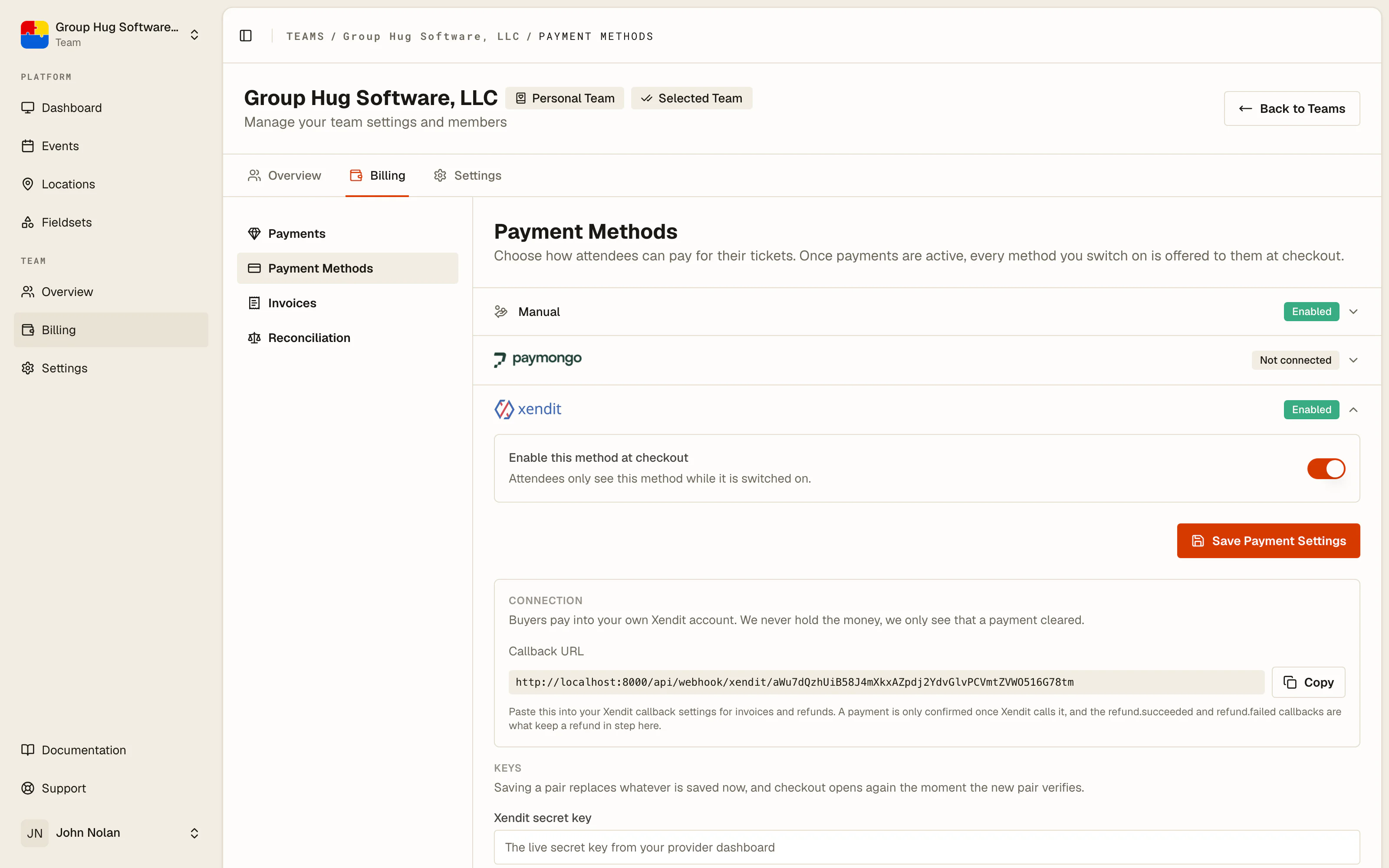
Xendit asks for a secret key and a callback token. Use a restricted Money-in key: it needs nothing from Money-out, Payouts or Balance, and a key that can move money out is a key we do not want and should not hold.
PayMongo asks for a secret key and a webhook signing secret. PayMongo has no callback token; the signing secret is the value its dashboard shows once, at the moment you create the webhook.
Stripe asks for a secret key and, if you want, a webhook signing secret. Use a restricted key (it starts with rk_live_) rather than your account's full secret key: the row lists exactly what it needs, and a key that can do only that is a key worth pasting. Leave the signing secret blank and we create the webhook endpoint on your Stripe account for you and keep the secret it hands back, which is the easier of the two roads. Paste a whsec_ secret instead and we leave your endpoint alone, which is what you want if you would rather create it by hand. Either way, a blank secret needs the key to carry Webhook Endpoints write access; the form tells you before it saves anything if it does not.
A gateway can only be connected by a team whose billing currency that gateway settles in. The pairing is refused when you connect rather than at your first sale, so you find out while you can still do something about it.
The callback URL comes first
Each gateway row shows a Callback URL above the key fields, with a copy button. It belongs in your provider's own settings before anything else works.
That URL is how your provider tells us a payment happened. Without it a buyer can pay perfectly well and nothing here will ever know: the order stays pending and the ticket is never issued. The URL never changes once the row exists, so this is a one-time job.
Each provider names the deliveries it has to be subscribed to in the help text under the field. Subscribe to all of them. The refund events matter as much as the payment ones, because they are what keeps a refund you make here in step with the money.
Test the connection
Test Connection on the row asks your provider whether the key you pasted works, and tells you what it said. Use it before you publish an event that depends on it. It is a much cheaper way to find a typo than a buyer at midnight.
One online gateway at a time
A team collects through one online payment method at a time. If one provider holds the slot and you want another, disconnect the first; the form says so rather than letting you save keys that would not be used.
Manual is not affected by this. Your published bank details can be offered alongside a connected gateway, and a buyer picks.
Disconnecting
Disconnect on a row stops that method being offered. Your keys stay on file and the row can be reconnected, but while it is disconnected nothing can be collected through it, and refunds on money it took are blocked, because a refund has to travel back through the provider that holds it. See refunds.
Disconnecting does not remove anything from your provider. A Stripe webhook endpoint we created for you stays on your Stripe account, quietly receiving nothing; delete it there if you want it gone. Reconnecting the same row replaces it rather than adding a second.
When your provider starts refusing your key
Keys get rotated, revoked, or expire. When your provider stops accepting yours, we email the people who may manage your team's billing.
It is worth knowing why that email matters. A refused key is invisible from the buyer's side: checkouts already open stay payable and money can still land, but nothing here can confirm it, so orders sit and tickets are never issued. Paste a fresh secret key on the row, test it, and the nightly reconciliation picks up whatever landed while the connection was dead.
Last reviewed September 10, 2026