Reconciliation.
The nightly check against your gateway, and its findings.
Every night we ask your connected gateway what it thinks happened, and compare it with what we recorded. Team settings > Billing > Reconciliation is where the differences show up.
Most teams never need this page. It is the safety net for the night your provider's notification never arrived, and the place to look when your gateway statement and your orders disagree.
What the nightly check does
At 03:30 each night, for every team collecting through a connected online gateway, we read a trailing window of that team's own provider transactions and diff it against our record of the same money.
It covers connected gateways only. An offline payment never passed through a provider, so there is nothing to compare it against and nothing here will ever rescue one. Those are confirmed by hand from the Orders page.
What it fixes by itself
A payment your provider took that never reached us.
When the provider's own row names a checkout we opened, the order can still be settled, the money is at least what the order costs, it is in the currency the order or your team's books are kept in, and nothing in the same read gave that money back, the order is settled exactly as the missing notification would have settled it. Tickets go out, the guest records are marked paid, and the platform fee accrues on the amount that actually moved.
That includes a payment that arrives after the registration has already expired. The hold ran out, but the registrants are real and the money has been captured, so it is reinstated rather than ignored.
It also accrues a platform fee that was missed on a sale we already recorded, and only when nothing suggests that sale was refunded.
Everything else is reported, never applied
The rest becomes a difference on this page for a person to look at. That is deliberate. The gateway account is yours, connected with your own keys, and intent cannot be read off a one-sided record. Guessing would be worse than asking.
Three cases are worth naming because they surprise people.
A refund you made in your provider's dashboard is flagged and never written down automatically. We can see that money went back; we cannot see which order you meant it for or how you want it split across attendees. This is the reason the advice everywhere else is to refund from the Orders page instead. See refunds.
An amount that disagrees with what we already recorded is flagged, never overwritten. If your provider says one figure and our ledger says another, the difference is raised and both numbers are left alone until somebody decides which is right.
A payment whose only tie to an order is the order number is flagged rather than settled. Your gateway account is yours and you sell other things through it, so an order number sitting in a reference field is not proof that the money is that order's, and settling on it could issue somebody else's tickets. When the provider's row names the checkout we opened, none of this applies and the order settles on its own.
You will also see rows for a transaction that matches no order in your team, a payment tied to an order that can no longer be settled, and a window in which your provider moved money but delivered no callbacks at all. That last one usually means the callback URL is missing or wrong in your provider's settings. See payment methods.
Reading the page
The three counters at the top are open differences, resolved ones, and how many of your events have at least one open difference against them.
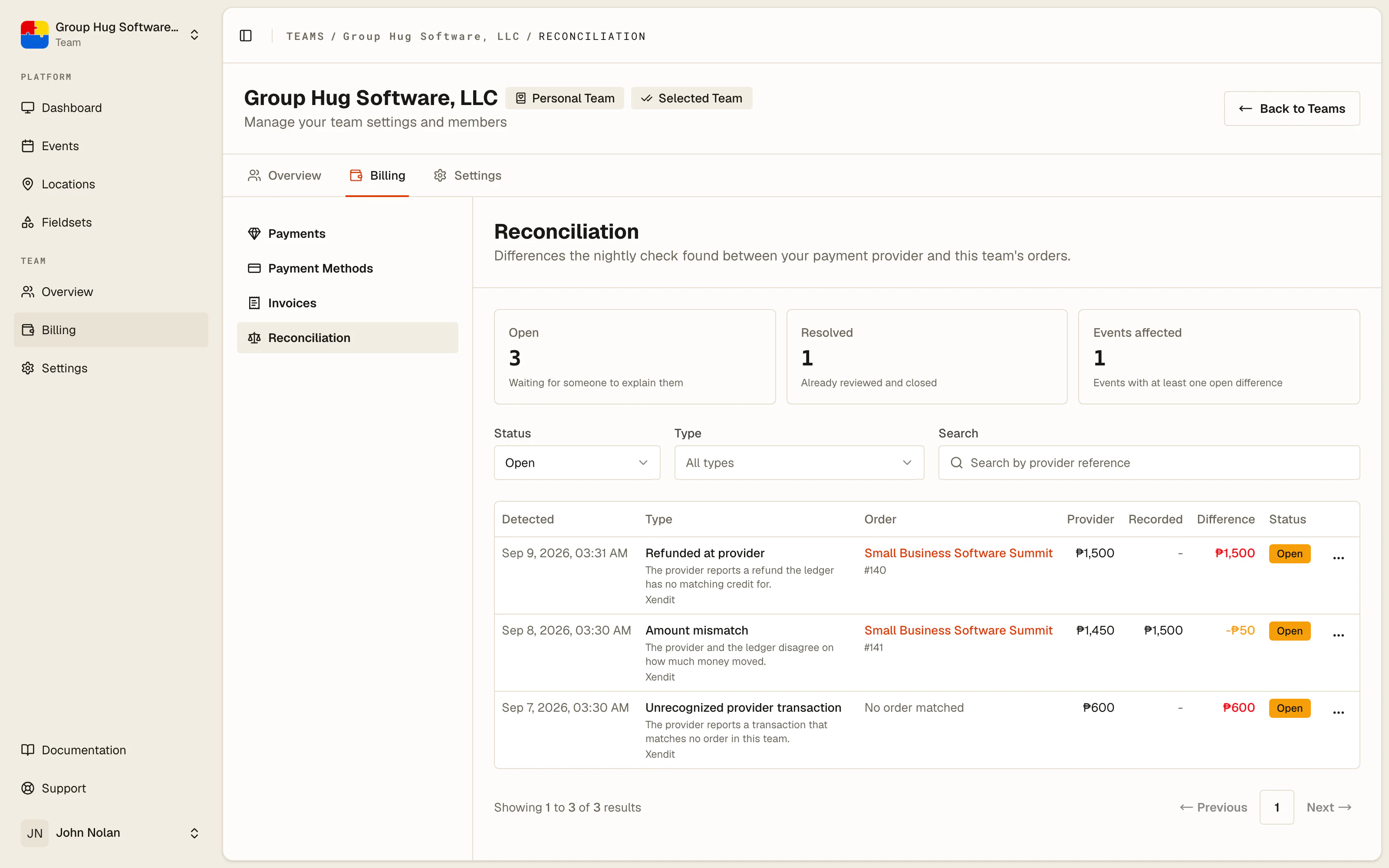
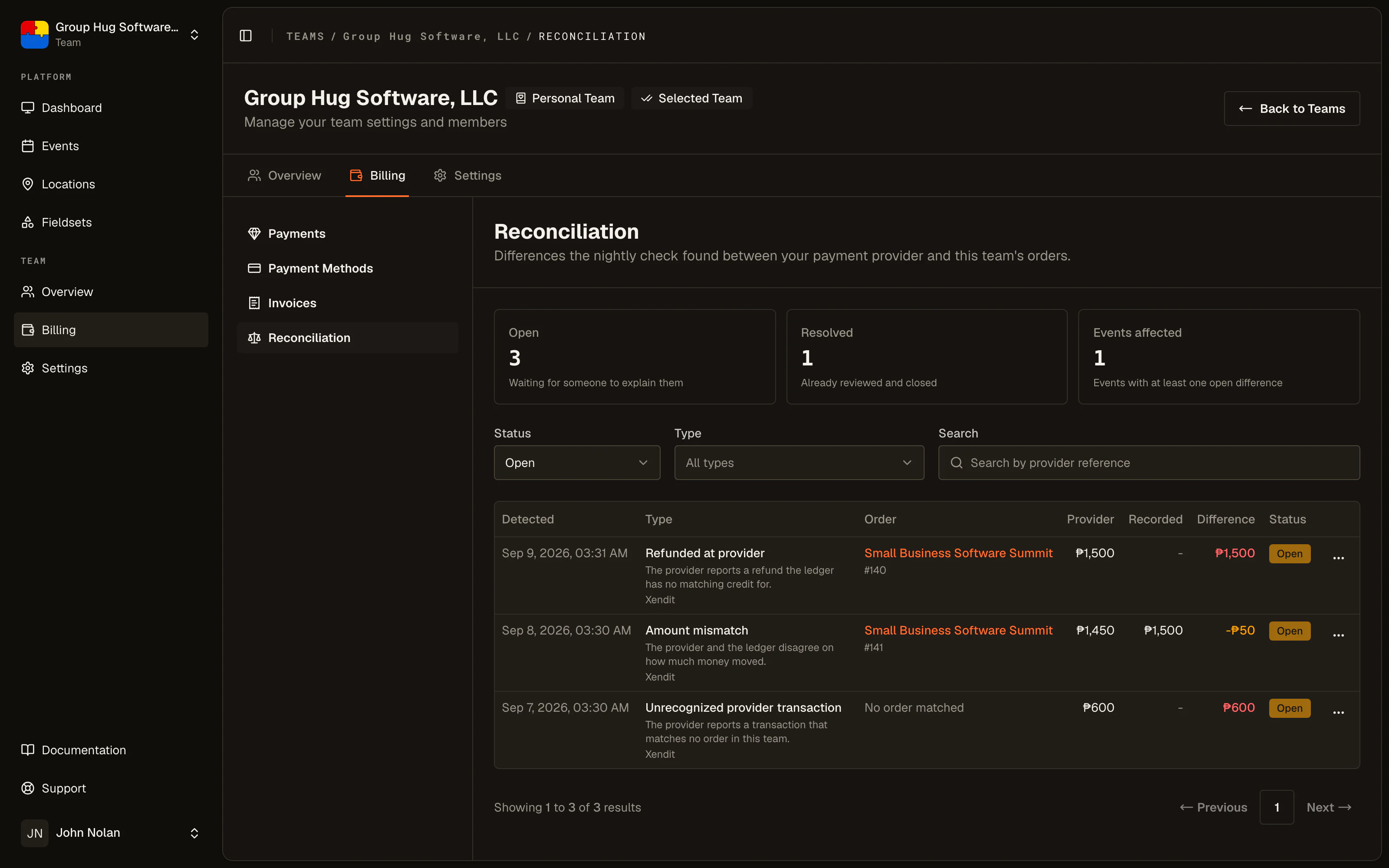
Below that, filter by status, by type, or search by the provider's own reference, which is the value you will have in front of you if you came here from a gateway statement.
Each row opens with View details: what the provider reported, what we recorded, the gap between them, the order it touches, and a link straight to that order. Where we recorded the payment itself, as with an amount that disagrees or a refund made in your provider's dashboard, View in and your provider's name on the order opens that payment in your provider's own dashboard, which is the other side of the comparison. For a payment we never recorded, search your provider's records for the Reference shown in View details instead.
An empty page reading Everything reconciles means your provider and your orders agree on every payment the last check looked at.
Resolving a difference
Resolve signs a row off. It records who closed it and, if you write one, a note saying what you checked and what you concluded.
Resolving changes nothing about the money. It does not settle an order, issue a ticket, record a refund or adjust a fee. It says a person has looked and the matter is explained. If the difference needs an actual correction, make it on the order first and then resolve the row.
A row that is already resolved stays that way. A second press from a stale tab changes nothing and is not an error.
Who sees this
Team administrators and the team owner, the same people who can reach the rest of the Billing section.
Platform administrators also see these differences across every team, which is how support can look at the same row you are looking at when you get in touch about one. Resolving is the same act from either side: the row stops being reported and keeps the first sign-off it was given.
Last reviewed September 10, 2026